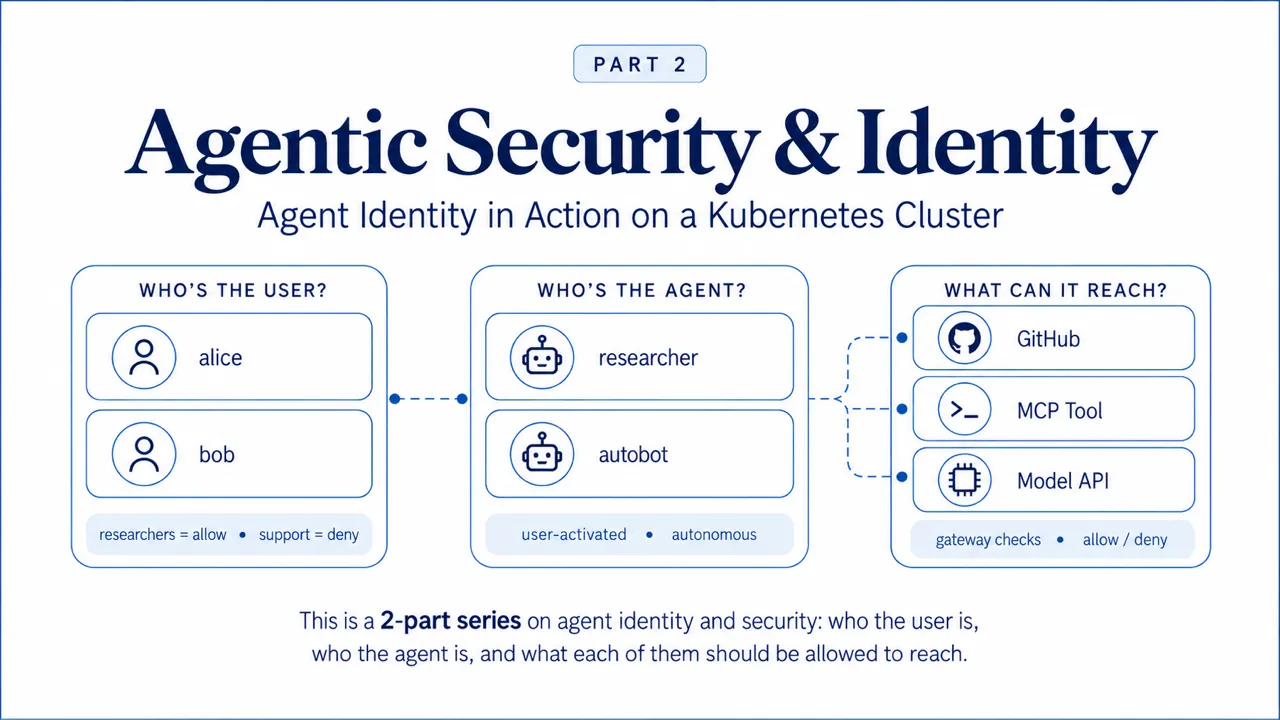
In Part 1 I designed how agent identity can work on a platform where agent-delegation is enabled, and how we decide (+ enforce) what they and their users are allowed to reach. In this second and final part I deploy that design on a cluster and check whether it actually holds up.
In this Part 2 blog post, I go through a hands-on use-case with 2 users of the same agent platform at the same company: Alice is in the researchers group and Bob is in the support group. Throughout this I will show the good, the bad and the ugly of agentic identity and security, especially when dealing with autonomous agents, and with users delegating permissions to an agent.
The walkthrough answers 4 questions:
- Does an agent requesting a tool for a user in the wrong group actually get refused?
- When an agent calls its own tool and model, how do we authorize (+ verify) the hops?
- What happens to an autonomous agent that has no user behind it at all?
- When Alice asks for a 3rd party service (i.e. github) via an agent, does the request go out as Alice?
Most of what I learnt came from the requests that got denied (+ from the complexities and lessons learned), so you'll see plenty of those below.
This is the hands-on half of the work I did adding agent identity and authorization to the Kubernetes Agent Orchestration System (KAOS), and Part 1 has the research and the 6 architecture decisions behind it.
Everything below runs on a local KIND cluster against the public Agentic Identity Broker release, pinned at v0.1.8. On a local cluster GitHub is a mock, so the consent screen gets completed automatically instead of in a browser, but every identity and access-control decision you'll see is real.
The Series So Far
Here's a quick refresher of what we covered in Part 1 before we run it.
I started with the challenges we all phase when agents have to access 3rd party services on behalf of a user. Here I showed how just giving an API token falls short, as you can't tell which user an action was for, it has more access than any single user needs, and you can't revoke it for just one user.
Fixing that needed a component that holds each user's own third-party credential, obtained with their consent. The Agentic Identity Broker does exactly that, so I adopted it instead of writing my own.
Then I separated the 2 identities that every protected call carries. The subject is the human the work is being done for, and the actor is the agent doing the work. This is how the system enforces resource access on the actor and use the subject for what the user personally delegated, which keeps permissions correct when agents call other agents.
Finally I made 6 architecture decisions, and 3 of them matter most for what follows:
| Decision | What I chose | What I turned down |
|---|---|---|
| Where enforcement lives | One gateway on every hop, plus a NetworkPolicy so nothing can go around it | Checks in the agent runtime, a sidecar per workload, a service mesh |
| How authorization is modelled | One explicit AccessGrant for who may enter an agent, with the agent's own dependencies derived from its spec, all evaluated by KAOS's own Open Policy Agent decision point | A policy language as the authoring surface, or the broker answering the decision |
| Who owns what | KAOS owns the integration; the broker and the identity provider run as their own releases | The platform installing and lifecycle-managing its own broker |
That third row is why this walkthrough has both a broker and Keycloak in it. The broker holds the delegated third-party credentials and performs the exchange, and the gateway attaches the returned credential to the outbound request. Keycloak proves who the human is, carries the group membership the rules match on, and registers each agent as its own client so the broker can tell which agent is asking.
Now let's build the cluster and see it work.
1. The control plane
The control plane is the set of components that establish identity and decide the rules. Apart from the gateway, none of them carry your agents' actual traffic; they answer the 3 questions from part 1 about it. Here they are on one map. The greyed pieces belong to section 5 and can be ignored for now.
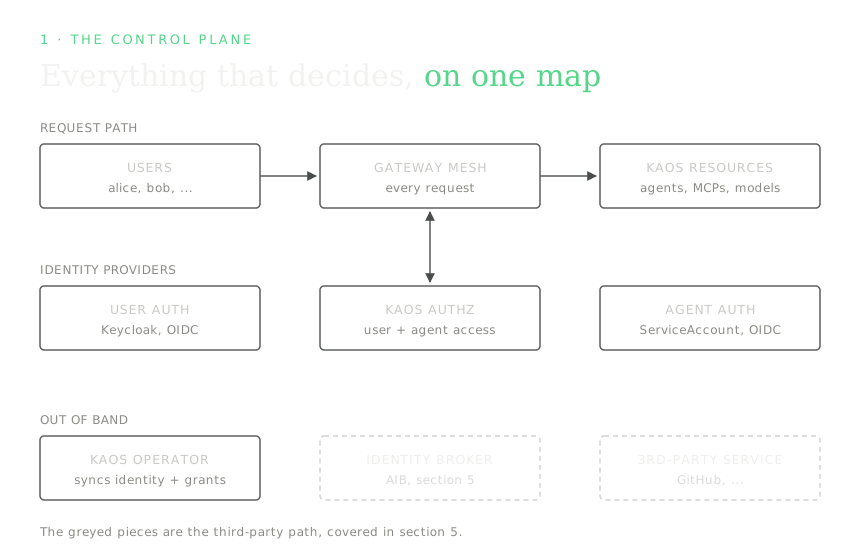
There are quite a few components in this overview, so let's walk through them:
- Gateway Mesh: This is the single gateway every request passes through, including agent-to-tool, agent-to-model and agent-to-agent calls, which is what makes it a mesh.
- User Identity Service: Authenticates users, proves who they are and which groups they belong to; supports OIDC compatible services so we use Keycloak here.
- Agent Identity Service: Gives each agent their identity through secure credentials; the default uses k8s Service Accounts, but also supports OIDC compatible services; we also configure Keycloak in this example.
- KAOS Authz Service: This is the authorization (authz) service that KAOS uses to allow/deny requests based on the "user" calling the "agent" accessing the "resource".
- Agent Impersonation Service: Lets an agent act on an outside service (like GitHub) as the user by exchanging third-party tokens (github/slack/etc) through a consent mechanism. The concrete tool I use is the Agent Identity Broker (AIB), and it gets its own section, section 5.
- KAOS Operator: This component synchronises auth & identity bidirectionaly; it registers the KAOS resources on upstream auth services, and injects identities and secrets across KAOS resources.
Before I show how this all fits together with an example, let's configure the kubernetes cluster with this setup.
1.1 Install it in one command
I use the KAOS CLI to install the Gateway Mesh, User Auth, Agent Auth, the KAOS Authz Service, the KAOS Operator, and the Agent Identity Broker (AIB).
This command wires everything together in a new cluster:
kaos system install \
  --gateway-strict \         # Traffic can only go through gateway
  --authz-enabled \          # KAOS Authorization service enabled
  --user-auth keycloak \     # Use Keycloak for User auth (alt: OIDC)
  --agent-auth keycloak \    # Use Keycloak for Agent Auth (alt: Service Accts. or OIDC)
  --token-exchange-enabled \ # Use AIB for token exchange

                         # Other flags
  --wait \               # Block until everything is ready
  --create-cli-config    # In-folder config file for cli
kaos system install --help lists everything else (image tags, resource limits, replica counts, realm names, observability backends); the Helm values behind each flag are shown per-component in section 4.
Let's confirm the pieces are healthy:
kaos system statusgateway ready
login service ready (keycloak)
access-control ready (2/2 replicas)
sync service readyAnd let's make sure that everything is configured correctly:
kaos config showgateway:
address: http://kaos-gateway.kaos-system.svc.cluster.local
through_gateway: true
auth:
issuer: http://keycloak.keycloak.svc.cluster.local:8080/realms/kaos
client_id: kaos
realm: kaos
broker_url: http://aib-agentic-identity-broker.aib-system.svc.cluster.local:8000
broker_admin_url: http://aib-agentic-identity-broker.aib-system.svc.cluster.local:14000/api
namespace: kaos-system
sessions: {}2. The data plane
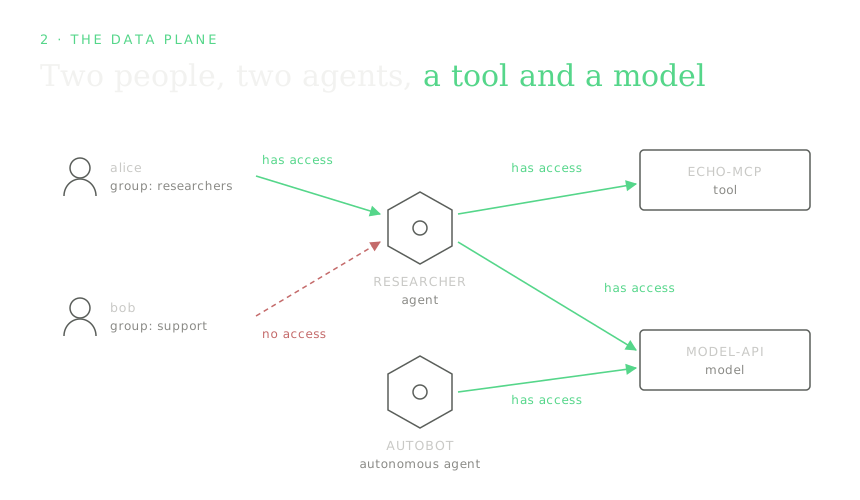
The data plane is the actual agent traffic, meaning users invoking agents and agents calling tools and models. Every one of those calls travels through the Gateway Mesh and is checked before it is let through.
The hands-on example uses the following resources:
- two users: alice (group
researchers) and bob (groupsupport) - two agents: researcher (user-activated) and autobot (autonomous agent)
- one MCP tool: echo-mcp
- one model: model-api (a model endpoint both agents may use)
- one external service: GitHub, covered in section 5
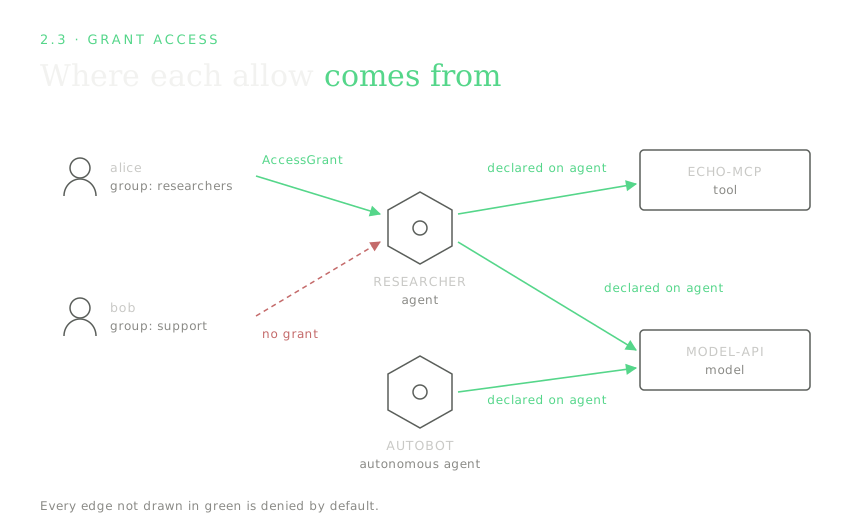
The rules are that the researchers group may use the researcher agent, the researcher agent may reach echo-mcp and model-api, and the autonomous autobot may reach model-api. Everything else is denied, including bob (poor bob).
Here's a chart that shows what we'll try to accomplish:
2.1 How identity flows through a request
Every call, a user/agent reaching an agent, or a user/agent reaching a tool or model, travels through the Gateway Mesh, which does two checks before letting it through:
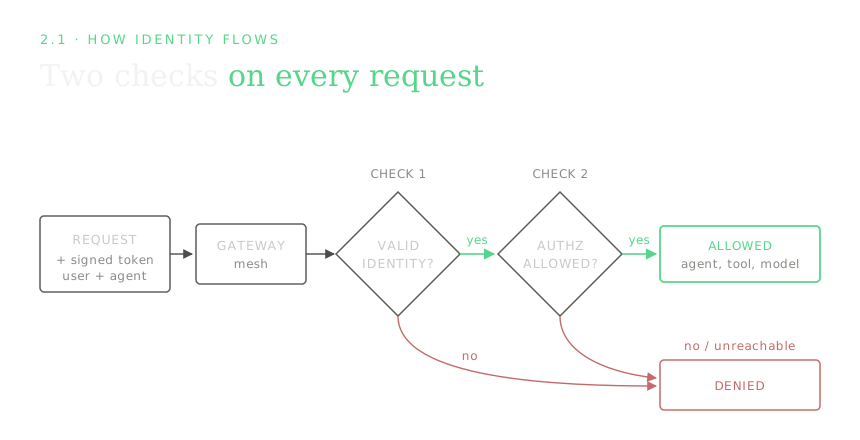
A signed token is like an ID card issued by the identity provider, and both the user and the agent hold one.
User Auth issues signed tokens for human users and it carries their groups (groups isn't a core OIDC claim, so the identity provider maps it in; with Keycloak that's a group-membership protocol mapper).
Agent Auth also issues signed tokens, but an agent starts from a credential it was given (a mounted ServiceAccount token, or a client secret) and exchanges that for one.
The gateway does the two checks in order; first it confirms the token is genuine and unexpired (identity), then it asks the KAOS Authz Service whether that identity is allowed to do this (permission), and only if both pass does the request reach its destination.
If the authz service can't be reached at all the request is denied. There's no config knob to loosen this, since the operator sets failOpen: false on every policy it generates, and it's the reason the authz service runs highly available.
2.2 Deploy the agents and tools
Everything the example needs (both agents, the tool, the model, and the access rule for who may use them) is bundled as a single sample. I deploy it with one command, then walk through each object and create it step by step.
Here's the one line deploy command:
kaos samples deploy 8-authorization-walkthrough -n kaos-systemmodelapi.kaos.tools/model-api serverside-applied
mcpserver.kaos.tools/echo-mcp serverside-applied
agent.kaos.tools/researcher serverside-applied
agent.kaos.tools/autobot serverside-applied
accessgrant.kaos.tools/researchers-to-researcher serverside-applied
Deployed sample '8-authorization-walkthrough'The tool's single function is an echo, and the model's responses are mocked, so every result is deterministic and the walkthrough only exercises access control. The four resources first, each a plain Kubernetes object (the access rule follows in 2.3):
| Resource | Kind | What it is |
|---|---|---|
| model-api | ModelAPI | A model endpoint both agents may call. |
| echo-mcp | MCPServer | A tool (an MCP server) exposing a single echo function the researcher may use. |
| researcher | Agent | A user-facing agent. It needs a person behind it and carries that person's identity through to whatever it calls. |
| autobot | Agent | An autonomous agent. No user behind it; it runs on a schedule and acts as itself. |
Reproduce it yourself
Each resource has its own kaos ... create command, so you can build a similar setup by hand and see the shape of each object. The model and tool first:
# a small in-cluster model endpoint
kaos modelapi create model-api \
  --mode hosted \
  --model "smollm2:135m"

# an echo tool exposed as an MCP server
kaos mcp create echo-mcp \
  --runtime python-string \
  --params 'def echo(message: str) -> str:
      """Echo a note for the authorization walkthrough."""
      return f"Echo: {message}"'
Then the two agents. The user-facing one references the model and tool it should use:
kaos agent create researcher \
  --modelapi model-api \
  --mcp echo-mcp \
  --instructions "Echo the user's request and use echo-mcp when asked."
The autonomous one adds an autonomous goal so it runs on its own interval instead of waiting for a person:
kaos agent create autobot \
  --modelapi model-api \
  --autonomous-goal "Produce the automated echo report." \
  --autonomous-interval 3600
[Collapsed section] Expand to see the equivalent Kubernetes objects
kaos ... create writes ordinary KAOS objects; this is what the sample applies. The ModelAPI runs in Proxy mode and each agent carries DEBUG_MOCK_RESPONSES, so the echo replies are deterministic. Note autobot differs from researcher mainly by its autonomous block. That single field is what makes it act as itself rather than needing a user.
apiVersion: kaos.tools/v1alpha1
kind: ModelAPI
metadata:
  name: model-api
spec:
  mode: Proxy
  proxyConfig:
    models:
      - '*'
---
apiVersion: kaos.tools/v1alpha1
kind: MCPServer
metadata:
  name: echo-mcp
spec:
  runtime: python-string
  params: |
    def echo(message: str) -> str:
        """Echo a note for the authorization walkthrough."""
        return f"Echo: {message}"
---
apiVersion: kaos.tools/v1alpha1
kind: Agent
metadata:
  name: researcher
spec:
  modelAPI: model-api
  model: echo
  mcpServers:
    - echo-mcp
  config:
    description: User-facing echo agent for authorization checks
    instructions: Echo the user's request and use echo-mcp when asked.
  container:
    env:
      - name: DEBUG_MOCK_RESPONSES
        value: '["{\"tool_calls\": [{\"id\": \"call_1\", \"name\": \"echo\", \"arguments\": {\"message\": \"authorization note\"}}]}", "Researcher echo response"]'
  agentNetwork:
    expose: true
---
apiVersion: kaos.tools/v1alpha1
kind: Agent
metadata:
  name: autobot
spec:
  modelAPI: model-api
  model: echo
  config:
    description: Autonomous echo agent for authorization checks
    instructions: Echo a short automated report.
    autonomous:
      goal: Produce the automated echo report.
      intervalSeconds: 3600
  container:
    env:
      - name: DEBUG_MOCK_RESPONSES
        value: '["Autobot echo response"]'
  agentNetwork:
    expose: true
2.3 Grant access
The sample deployed one more object alongside the resources, an AccessGrant, which is the rule for who may reach what. Access control is on, so nothing is reachable until it's authorized, and this grant is what lets alice's group in. It binds a subject (who) to one or more resources (what). Like the resources, you can write it yourself with kaos auth grant create, and --dry-run shows you the object instead of applying it:
kaos auth grant create --group researchers --resource agent/researcher --dry-runapiVersion: kaos.tools/v1alpha1
kind: AccessGrant
metadata:
name: researchers-to-researcher
spec:
subjects:
- kind: Group
name: researchers
resources:
- kind: Agent
name: researcherA subject has a kind of Group (matched against the groups in the user's token), User (matched against the user's subject or email), or Agent. A resource names a kind (Agent, MCPServer, ModelAPI, or MemoryStore) and a name, or a label selector to match many at once. Apply it (drop --dry-run):
kaos auth grant create --group researchers --resource agent/researcher[OK] created AccessGrant researchers-to-researcherThat's the only grant I write, which may surprise you, since the researcher agent reaches echo-mcp and model-api, and autobot reaches model-api, and I grant neither. An agent's access to its own tools and model is derived from the agent itself. When you declared researcher with modelAPI: model-api and mcpServers: [echo-mcp], the KAOS Operator projected those links straight into the enforcement data, so the declaration is the authorization. There's no separate AccessGrant to write for it, and none shows up in kubectl get accessgrant. The one thing that has no home in the agent spec is which users may enter an agent, so that's the single grant you create.
The declaration is the authorization.
So the grant list is short:
kaos auth grant listNAME SUBJECTS RESOURCES ENFORCED
researchers-to-researcher researchers researcher TrueThe ENFORCED column is the KAOS Operator reporting back, and True means it has projected the rule into the Authz Service and the gateway is enforcing it. False would name the reason, for example that access control is not enabled or that no user login provider is configured.
If you ever need an agent to reach something it did not declare, you can add an --agent grant (kaos auth grant create --agent <agent> --resource ...). That AccessGrant is merged on top of the derived access. For the common case, declaring the dependency is all you need.
Those permissions (the one grant you wrote plus the ones derived from the agent specs) are the only access that exists. Here's the same map, each green edge labelled with where its permission comes from, and everything not green is denied:
3. Walk the example
3.1 Log in as the users
kaos auth login gets a token from the login service and remembers it, printing what that login proves:
kaos auth login alice --password kaos-password
kaos auth login bob --password kaos-password
[OK] logged in as alice - groups: researchers
[OK] logged in as bob - groups: supportThe "groups" it prints are the exact claim the gateway will read out of the token on every request, and the exact thing an AccessGrant's Group subject matches against. alice carries researchers and bob carries support. alice as an individual isn't granted anything, her group is.
3.2 Run the requests
--user sends the call through the gateway as that person, and the CLI prints the plain result:
kaos agent invoke researcher --user alice -m "summarise repo X"
kaos agent invoke researcher --user bob -m "summarise repo X"
Researcher echo response
[OK] allowed - request permitted
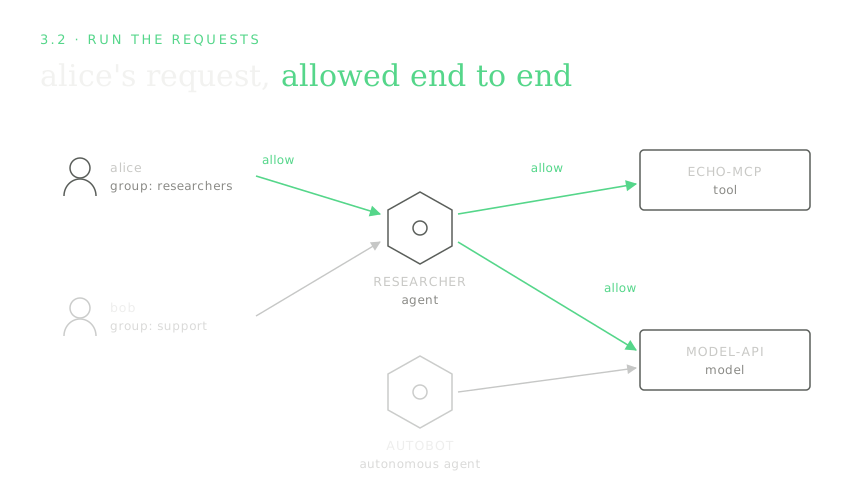
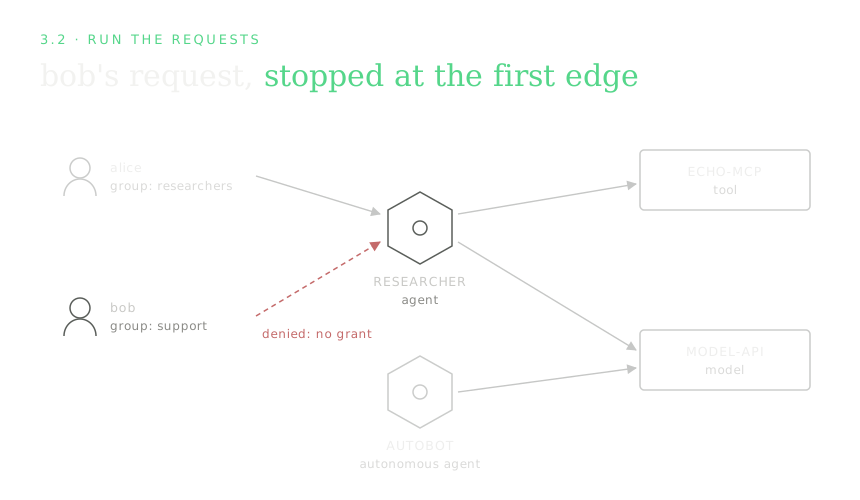
[X] denied - user not in a granted groupSame agent and same request, and the only difference is who's behind it. alice's token carries researchers, which the researchers-to-researcher grant allows, and bob's carries support, which nothing grants, so he's refused at the door. alice's request lights up the granted path:
...while bob's request never gets past the first edge:
The agent using its granted tool and model:
kaos agent invoke researcher --user alice -m "read echo-mcp and ask model-api"Researcher echo response
[OK] allowed - request permittedThis exercises the second kind of rule. alice got in (first check), and now the agent reaches out to echo-mcp and model-api. Each of those hops is itself a request through the gateway, checked against the access researcher declared on its own spec (mcpServers: [echo-mcp], modelAPI: model-api). Both are declared, so both succeed, and they're the two right-hand green edges on alice's diagram above.
The autonomous agent acts as itself (no user), allowed only what it was granted:
kaos agent invoke autobot -m "run the automated report"Autobot echo response
[OK] allowed - request permitted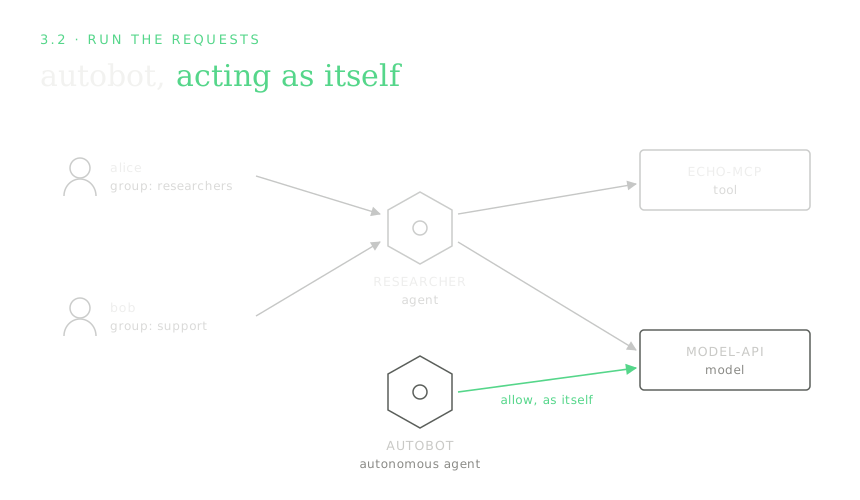
There's no --user here, yet the call is allowed, while the very next example (a user-facing agent with no --user) is denied. Both are fail-closed working as intended. The autonomous agent presents its own identity, which is valid, and the third rule lets that identity reach model-api. A user-facing agent invoked with no --user has no user identity behind it, and it needs one:
kaos agent invoke researcher -m "summarise repo X" # no --user[X] denied - no valid identityAnd the fail-closed guarantee itself. kaos system access-control scales the KAOS Authz Service up or down, and with it gone the gateway denies:
kaos system access-control --off
kaos agent invoke researcher --user alice -m "hi"
kaos system access-control --on
[OK] access-control off
[X] denied - access-control unavailable (failing closed)
[OK] access-control onThat's every rule from section 2 proven with plain commands, and nothing was configured by hand in User Auth or the Authz Service; the KAOS Operator kept them aligned with the objects you declared.
4. How each piece works
The example above shows what happens, and this section explains how, one capability at a time. Each sub-section ends with the actual configuration behind it (declared objects and Helm values).
4.1 Agent identity: how does an agent prove who it is?
How does the gateway know which agent is calling, even when no person started it? That's Agent Auth's job, and it's the one place on the section 1 map where the KAOS Operator's out-of-band work is easiest to see. Here's the same map from the operator's point of view, with the sync work drawn in:
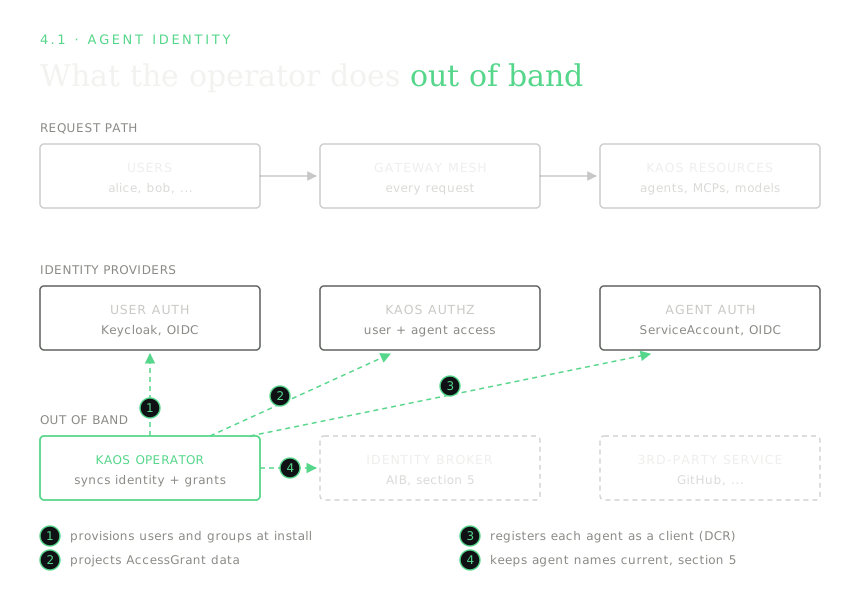
Every agent gets an identity so the gateway knows who is calling. By default that identity is a Kubernetes ServiceAccount. When an agent's pod starts, KAOS mounts a short-lived ServiceAccount token into it, scoped so it's only valid for the gateway (its audience is kaos-gateway). Every call the agent makes carries that token; the gateway reads it to learn which agent is calling, then checks that agent's grants. The token expires and is refreshed automatically, so there's no long-lived secret sitting in the pod. This is Kubernetes' standard bound, audience-scoped ServiceAccount token mechanism (KEP-1205), not anything KAOS invents. The operator registers each agent so the Authz Service recognises it.
I selected keycloak at install instead, because delegated third-party access (section 5) needs each agent to hold a login-service identity. With keycloak, the operator registers each agent as its own client in User Auth automatically, using dynamic client registration (DCR), which is the "registers each agent as a client" edge on the chart. No one creates those clients by hand. The stored Kubernetes Secret holding the agent's client credentials is the idempotency key, so if the Secret is present the agent is already registered, and deleting it forces a clean re-registration on the next reconcile. Timing differs by subject too, as the chart's other edges show; users and groups are provisioned once at install, while each agent's client is created when the agent is reconciled. For everything in sections 1 to 4, serviceaccount is simpler and I'd prefer it; only section 5 requires keycloak.
An autonomous agent (like autobot) has no user behind it, so it acts as itself. Its own identity is the "who asked", and it can reach only what that identity was granted. A user-facing agent (like researcher) instead carries the user's identity through to whatever it calls, so downstream checks see the real person.
[Collapsed section] Expand to see the Helm values that drive agent identity
Agent identity is a single provider choice under security.agentAuth.identity. The default provider is Kubernetes-native:
security:
  agentAuth:
    gatewayJwtOptional: true
    identity:
      provider: serviceaccount # the default
      serviceAccount:
        audience: kaos-gateway
        expirationSeconds: 3600
        tokenPath: /var/run/secrets/kaos-agent/token
gatewayJwtOptional: true means that for agent tokens, the Authz Service performs the full identity check; the gateway's own user-token check does not block agent calls. Autonomous agents need this, because their Kubernetes-issued ServiceAccount token isn't a user login token, and the user login provider would otherwise reject it before the access check ever runs. The serviceAccount block is the short-lived mounted token described above, valid only for the gateway (audience), auto-refreshed (expirationSeconds) and read from tokenPath.
Switching the provider is the whole difference between the two modes, and this is what --agent-auth keycloak sets:
security:
  agentAuth:
    identity:
      provider: keycloak # each agent becomes its own login-service client
With this provider the operator registers each agent's client via dynamic client registration and stores its credentials in a Kubernetes Secret (the idempotency key described above; delete it to force re-registration on the next reconcile). This is heavier than serviceaccount, and needed only when the agent must present a login-service identity to the Agent Identity Broker (section 5).
4.2 User identity: who is this person, and what groups are they in?
Who is this person, and which groups are they in? When a person is behind a request, User Auth (Keycloak in this example) proves who they are and which groups they're in. That group membership is what access rules match on, so alice isn't granted access personally, her group researchers is. The intuition in one picture:
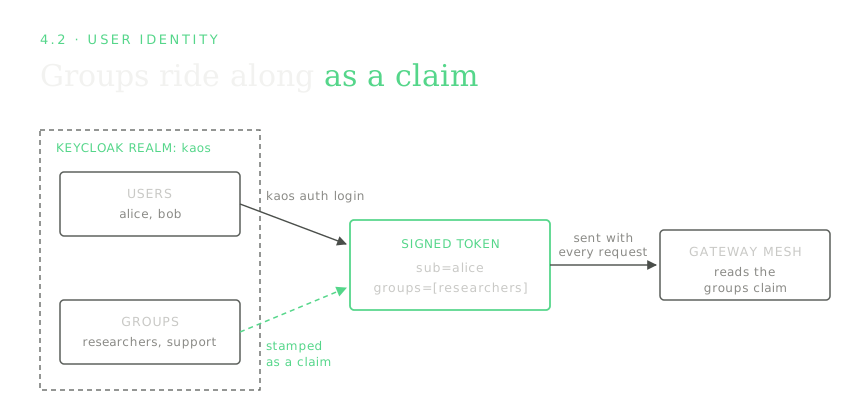
kaos auth login ran the standard login exchange and cached alice's token; the groups it printed are the same ones the gateway will read on every request. The one thing KAOS requires of the login service is that issued tokens carry a groups claim (and a stable subject claim naming the user). Everything else about your identity provider, how people actually authenticate, where the groups come from, is up to you.
[Collapsed section] Expand to see the Keycloak realm KAOS configures
The installer creates a realm with the users, the researchers/support groups, and a set of protocol mappers that stamp the right claims onto every issued token. Without the groups mapper, tokens wouldn't carry group membership and group-based AccessGrants couldn't match. This is the shape KAOS provisions (trimmed to the relevant pieces):
{
  "realm": "kaos",
  "enabled": true,
  "groups": [{ "name": "researchers" }, { "name": "support" }],
  "users": [
    {
      "username": "alice",
      "email": "alice@example.com",
      "enabled": true,
      "groups": ["researchers"],
      "credentials": [{ "type": "password", "value": "...", "temporary": false }]
    },
    {
      "username": "bob",
      "email": "bob@example.com",
      "enabled": true,
      "groups": ["support"],
      "credentials": [{ "type": "password", "value": "...", "temporary": false }]
    }
  ],
  "clients": [
    {
      "clientId": "kaos",
      "publicClient": false,
      "secret": "kaos-dev-secret",
      "directAccessGrantsEnabled": true,
      "standardFlowEnabled": true,
      "protocolMappers": [
        {
          "name": "kaos-groups",
          "protocolMapper": "oidc-group-membership-mapper",
          "config": {
            "claim.name": "groups",
            "full.path": "false",
            "access.token.claim": "true"
          }
        },
        {
          "name": "kaos-subject",
          "protocolMapper": "oidc-usermodel-property-mapper",
          "config": {
            "user.attribute": "id",
            "claim.name": "sub",
            "access.token.claim": "true"
          }
        },
        {
          "name": "kaos-audience",
          "protocolMapper": "oidc-audience-mapper",
          "config": {
            "included.client.audience": "kaos",
            "access.token.claim": "true"
          }
        }
      ]
    }
  ]
}
The gateway is told where to find this realm and what audience to expect through two Helm values:
security:
  userAuth:
    issuer: http://keycloak.keycloak.svc.cluster.local:8080/realms/kaos
    audience: kaos # tokens must be minted for this audience
In production you point --user-auth at your own OIDC provider instead, and map your existing directory groups into the groups claim. KAOS doesn't care how the claim gets populated, only that it's there.
4.3 Access control: the rules and their enforcement
This is where "is it allowed?" gets answered, and there are two kinds of rule:
- Who may use a resource. An
AccessGrantbinds a group (or user) to a resource: "researchersmay useresearcher." This gates a person reaching an agent. - What an agent may reach. An
AccessGrantbinds an agent to tools/models: "researchermay reachecho-mcpandmodel-api." This gates movement between components.
Both are the same object type, and only the subject differs (a group/user vs. an agent). I kept it uniform so there's one rule format to learn, one place to look, and one kaos auth grant list that shows every explicit grant in the cluster.
Enforcement lives at the gateway, which asks the KAOS Authz Service on every request. That service runs in-cluster as its own always-on service with multiple replicas, so it's highly available. It fails closed, so if it says no or can't be reached the request is denied (you saw this with --off). And resources are only reachable through the gateway when --gateway-strict is set, so a workload can't sidestep it by calling a resource directly.
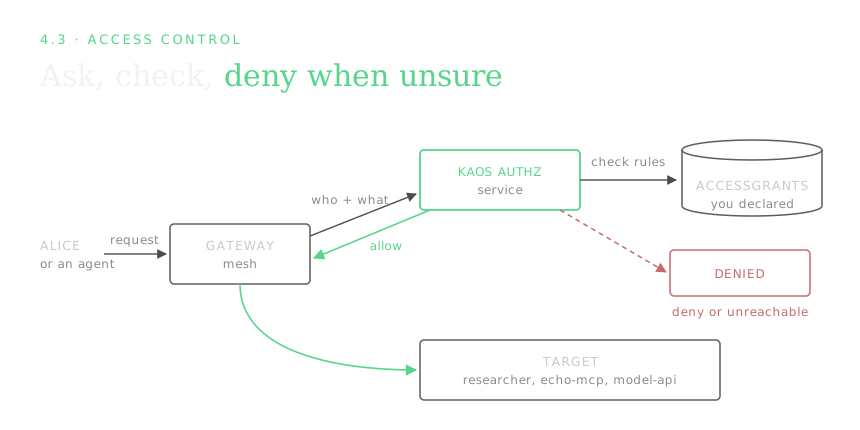
The Authz Service never reads your AccessGrant objects directly. The KAOS Operator is the go-between, so it watches the objects, compiles them into the data the Authz Service evaluates, and keeps that projection current as you add and remove grants. The ENFORCED column you saw earlier is the operator confirming the rule is live.
Autonomous agents fit the same model. Their own identity is the subject, so autobot needs a grant for anything it touches, exactly like a user does.
[Collapsed section] Expand to see the Helm values that drive enforcement
Enforcement is the KAOS Authz Service (stock OPA behind Envoy's authorization plugin) plus the operator's projection of your grants into it:
security:
  pdp:
    enabled: true # the KAOS Authz Service
    image: openpolicyagent/opa:1.18.1-envoy-static
    replicas: 2 # highly available
  agentAuth:
    authorization:
      # "automated": the KAOS Operator projects grant data from your
      # AccessGrant objects. You never author decision-service policy by hand.
      policyDataSource: automated
    projection:
      # prune removes stale grant data when an Agent or AccessGrant is deleted,
      # so permissions never outlive the object that declared them.
      prune: true
  # the "gateway is the only path" posture, so the check can't be bypassed
  strictGatewayApi:
    enabled: true
  networkPolicy:
    enabled: true # deny direct workload-to-workload traffic
  gatewayRouting:
    enabled: true # route agent -> tool/model/peer calls via the gateway
The fail-closed behaviour is how the gateway treats an authorization backend that says no or doesn't answer, and denying on "no answer" is the default and can't be relaxed into "allow on error".
What I learned: Fail-closed means treating "no answer" from the authz service as a deny. That safe default costs availability, which is exactly why the Authz Service runs HA.
Further reading on the enforcement model. Checking every hop at a gateway is a standard zero-trust shape, a policy enforcement point (the gateway) consulting a policy decision point (the Authz Service), in the vocabulary NIST SP 800-207 formalised. The concrete mechanism, an Envoy external-authorization filter calling out to a policy engine, is documented in the OPA-Envoy plugin. And while agents here default to Kubernetes ServiceAccounts, the same workload-identity idea generalises beyond the cluster through SPIFFE/SPIRE and the emerging IETF WIMSE work.
5. Agents acting on behalf of users - on outside services
What happens when the researcher agent needs to access GitHub on behalf of the user? Whose GitHub account does it act on?
Everything so far focuses on identity for access control, and nothing yet lets an agent reach external oauth services like GitHub as the specific user instead of through a shared bot account.
5.1 The intuition
The naive way to let an agent use GitHub is to give it a single bot account's token and let every user's request ride on it (I did exactly this the first time round). People build it because it's the easy thing to build, one token in a Secret, one HTTP client, done. But it's a shared credential, so GitHub sees one identity for everyone, you can't tell whose request was whose, and revoking one person's access means rotating the token for all of them. Worse, that durable token now lives somewhere the agent can read.
Nothing from sections 1-4 can fix it, because an in-cluster AccessGrant can't express "GitHub as alice". The cluster has no authority over GitHub's tokens, so it can decide whether a request leaves, but it can't make GitHub see alice instead of the bot. Bridging that gap needs a component that holds each user's real GitHub credential (issued by GitHub, consented to by the user) and puts the right one on each outbound call.
KAOS does the opposite of the shared bot on all 3 counts. When alice asks the researcher to touch GitHub, GitHub receives alice's own token and sees alice, and bob's requests go out as bob, so permissions and audit on the GitHub side are per-person, exactly as if each user called GitHub directly. The agent only ever holds its own short-lived in-cluster identity, because the real GitHub token is swapped onto the outbound request at the gateway and the agent code never touches it. And alice can withdraw her approval at any time without affecting anyone else.
5.2 Enter the Agent Identity Broker (AIB)
The component that holds each user's real credential is the Agent Identity Broker (AIB; deployed from the agentic-identity-broker chart). It runs as its own self-managed Helm release alongside the cluster, much like Keycloak, and the KAOS operator deploys none of it. It holds each user's real third-party tokens in a vault, put there when the user consents (5.4), and the one thing it does with them is exchange. Present it proof of who the user is and which agent is acting, and it returns that user's stored third-party token. It never issues anyone's identity; agents get theirs from Agent Auth, users from User Auth, and the AIB only ever trades one proven identity for a stored credential.
Nothing new gets installed here. Every component in this section went in with the single install command in 1.1 (--agent-auth keycloak, --token-exchange-enabled). On the section 1 map the greyed pieces light up, and everything else goes grey:
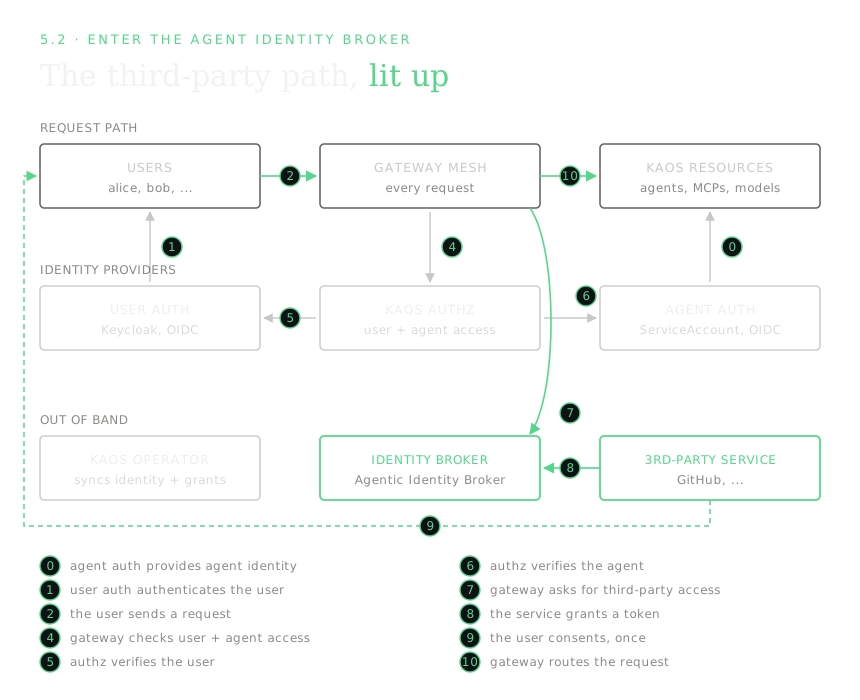
This is also why the install needed --agent-auth keycloak. The AIB must be able to tie an exchange request to a specific agent, and for that the agent needs a login-service identity, which a ServiceAccount can't give it. The KAOS Operator keeps the connection current from the other side, registering each agent in the AIB under a stable logical name (kaos/<namespace>/<name>) and keeping that record's client id up to date across re-registrations (the greyed operator edge on the 4.1 chart).
5.3 Register GitHub and create a permission set
echo-mcp is a tool inside the cluster, a KAOS resource gated by AccessGrants, and GitHub is a service outside it. You could wrap GitHub in an internal MCP server with a shared bot token, which is exactly the anti-pattern from 5.1. Instead, GitHub is declared in the AIB, and each call goes out as the real user.
Outside services are administered in the AIB itself and not as cluster objects, because the AIB is what actually holds the user's third-party tokens. The declaration has 3 parts: the service (GitHub, meaning its API hostname and OAuth endpoints), a permission set (the scopes an agent may request on it), and the agent link (which agent may use that permission set, keyed by the agent's stable logical name). The operator keeps that logical name and the agent's login-service client current, and reflects the declaration into the cluster plumbing it implies. The token swap exists only on the GitHub route, so internal traffic never touches the AIB. This is the same boundary the MCP security best practices draws when it forbids token passthrough and requires audience validation; a token minted for one hop must never be silently reused on another, which is the classic confused-deputy trap.
[Collapsed section] Expand to see the outside-service declaration in the AIB
The declaration is AIB-native. There's no third-party YAML in your Git repo, since the AIB is the config authority and it's where third-party access is audited (the trade-off I accepted for keeping it out of the cluster API).
# Administered in the AIB, not as a Kubernetes object.
service:
  name: github
  hostnames: ['api.github.com']
  oauth:
    authorization_url: https://github.com/login/oauth/authorize
    token_url: https://github.com/login/oauth/access_token
  scopes: ['repo', 'read:user']

permission_set:
  service: github
  scopes: ['repo', 'read:user']

agent:
  logical_name: kaos/kaos-system/researcher
  client_id: <keycloak-dcr-uuid>
  permission_sets: ['github']
The logical_name is the stable agent name the operator maintains; client_id is the agent's login-service client (the DCR UUID from 4.1), kept current across re-registrations. From this declaration the operator materializes the egress route to api.github.com, attaches the AIB's token-swap filter to only that generated route, and injects the exchange target into the bound agent. Nothing here touches the internal access-control path.
Inside the cluster nothing about the earlier checks changes, so alice still has to be allowed to use the researcher, and the researcher still has to be granted its tools. The new part is only the last hop, the outbound call to GitHub.
5.4 The request and consent flow
The user's identity travels all the way through the agent to GitHub, so every call goes out as the real user and GitHub sees alice.
The very first time alice asks for something on GitHub there's no approval on file, so the request is refused with an instruction. alice approves once, the AIB stores her token, and from then on it just works until she revokes it:
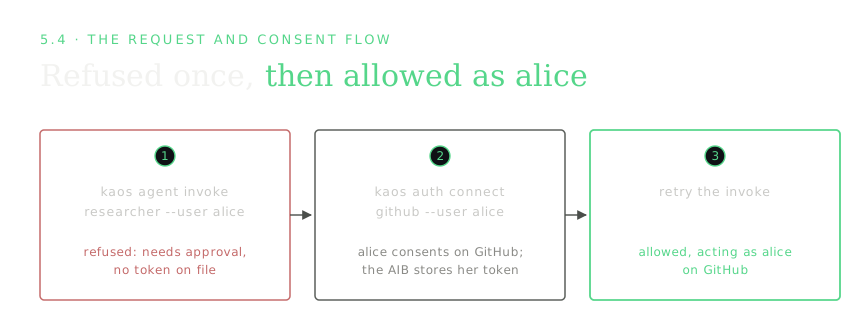
Walk it for real. The first time, there's no approval yet:
kaos agent invoke researcher --user alice -m "list my GitHub repos"[X] needs approval - run: kaos auth connect github --user alicealice approves. The CLI opens GitHub's approval screen, she clicks allow, and the AIB stores her token:
kaos auth connect github --user alice[OK] connected - alice can now use github through their agents(On a local demo cluster the approval is completed automatically against a mock GitHub, so the notebook runs without a real browser; in production alice clicks "allow" in her browser. That's the only difference.)
Retry. Now it works, as alice:
kaos agent invoke researcher --user alice -m "list my GitHub repos"Third-party tool completed.
[OK] allowed - acting as alice on githubApproval is revocable, and revocation simply returns you to step 1 of the flow, so after a disconnect the agent is refused again until re-approved:
kaos auth disconnect github --user alice
kaos agent invoke researcher --user alice -m "list my GitHub repos"
[OK] disconnected
[X] needs approval - run: kaos auth connect github --user aliceUnder the hood, that successful call is three moves:
- The agent runtime re-mints alice's own token so it also names the acting agent. This is a standard OAuth 2.0 token exchange (RFC 8693) against User Auth, authenticated with the agent's own client credentials, and it produces a token with
sub=alice,azp=researcher,aud=token-exchange-broker, one token that proves both who the user is and which agent is acting. This is what it means for the agent to impersonate the user, or act on its behalf (the terms are used interchangeably); the exchanged token keeps both identities, so the action stays auditable as alice via researcher and not as an anonymous bot. - On the outbound GitHub route, and only on that route, the gateway presents the re-minted token, together with the agent's own credential, to the AIB. The AIB validates both, checks that alice consented, and returns alice's real GitHub token from its vault.
- The gateway swaps alice's GitHub token onto the outbound request. GitHub receives it and sees alice (steps 7-10 on the 5.2 map).
The token swap can never leak onto internal paths, because the swap filter is attached only to the egress route the operator generated for the declared service. Only alice's own token ever reaches GitHub, and the agent never sees a long-lived credential. But you don't have to think about any of that, since you connect once and then invoke --user as normal.
Further reading on acting on behalf of a user. Nothing in this pattern is bespoke to KAOS, and the same shape shows up in a few places:
- RFC 8693: OAuth 2.0 Token Exchange is the standard behind the re-mint, covering both impersonation and delegation semantics and the
actclaim that names the acting agent. - Christian Posta on OAuth delegation and "on behalf of" for AI agents argues for the same gateway-mediated, preserve-both-identities model from the agent-gateway world.
- The IETF draft on On-Behalf-Of User Authorization for AI Agents is an early standardisation attempt that adds an explicit user-consent step on top of token exchange, mirroring the AIB's connect/approve flow.
Closing Thoughts: Making Agent Identity Boring
Back to Alice and Bob sending the same request and deserving different answers, and Alice asking for GitHub and deserving to be the one GitHub sees. I asked 4 questions at the top, and I can answer all of them now.
A user in the wrong group is refused at the door. Same agent and same message, and the only difference is who's behind it. alice's token carries researchers, which the one grant I wrote allows, and bob's carries support, which nothing grants, so he never reaches the agent at all.
The agent's own hops were authorized by its declaration. I wrote exactly one AccessGrant in the entire walkthrough. The researcher reaching echo-mcp and model-api was authorized by the dependencies I declared on the agent, which the operator projected straight into the enforcement data, so that's one less thing to keep in sync.
The autonomous agent acted as itself and was still checked. autobot has no user behind it and is allowed anyway, because it presents its own identity, which is valid, and it can reach only what that identity was granted. The user-facing agent invoked with no user is refused, because that one has no identity behind it at all.
And the GitHub endpoint received alice. She consented once, the broker stored her token, and every call after that went out carrying her delegated identity. When she disconnected, the very next request was refused again. The agent never held her credential at any point in that sequence, because the exchange happens at the gateway on one specific egress route and nowhere else. On this cluster the endpoint on the far end is a mock, so what I proved is the delegation path and not GitHub's own behaviour.
What I'd take away from building this is that almost none of it is exotic. It's OAuth token exchange, an OIDC provider, a gateway doing external authorization, a NetworkPolicy, and one component holding consented credentials that I can now install instead of writing. What made this expensive for everyone was that the credential vault and the consent surface were homework each team had to do alone, and that piece has just been open sourced.
If your agents can act as your users without ever holding their credentials, identity has become the dull part of the platform, and I think that's exactly where it belongs.
The series:
- Part 1: the problem, what to build on, and the broker. The three questions every agent request has to answer, the standards and tools that already exist, what the Agentic Identity Broker does, and the architecture decisions I made on top of it.
- Part 2 (this post): agent identity in action. A worked example that runs end to end on a cluster, with two users, two agents, a tool, a model and a third-party service, and real allow and deny outputs.